
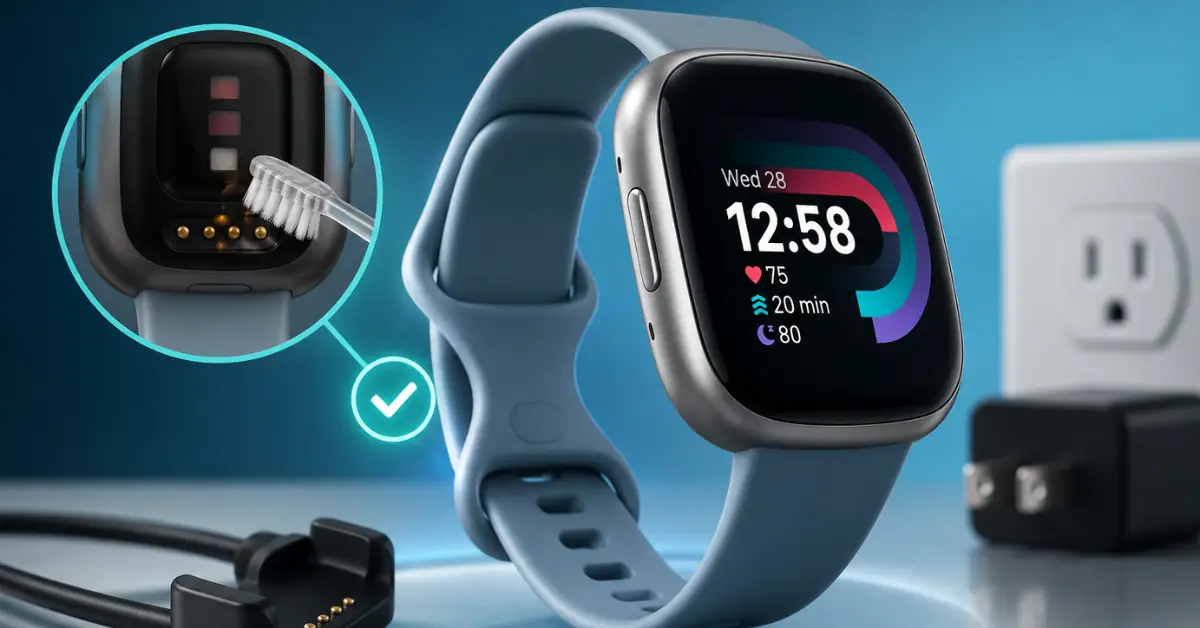
You plugged in your Fitbit, waited for it to charge — and an hour later it’s still at the same percentage. Or maybe it charges to 100% but drops to 20% within a few hours of unplugging.
Either way, a Fitbit that won’t hold a charge is one of the most frustrating problems a Fitbit user can face.
A reader recently emailed asking why their Fitbit Charge 6 was losing charge within hours of unplugging — even after a full overnight charge.
After walking them through the fixes below, it turned out to be a dirty charging contact issue. Two minutes with a dry toothbrush fixed it completely. No replacement needed.
That story is more common than you’d think.
In this guide, I’ll walk you through 7 real fixes for a Fitbit Not Charging — covering all major models including Charge 6, Versa 4, Inspire 3, Sense 2, and Luxe.
Is this really a charging problem or a battery drain problem? These are two different issues. If your Fitbit charges fine but the battery runs out too quickly during the day, check our guide: Why Is My Fitbit Battery Draining Fast? 10 Proven Fixes
Fitbit Not Charging vs Battery Draining Fast — What’s the Difference?
Before jumping in, identify exactly which problem you’re dealing with:
| Symptom | Your Problem | Guide |
|---|---|---|
| Fitbit won’t charge at all — stuck at 0% | Charging issue | This guide |
| Charges but drops rapidly after unplugging | Contact/calibration issue | This guide |
| Shows 100% then shuts off suddenly | Aging battery | This guide |
| Charges fine but dies in 1–2 days during use | Battery drain issue | Battery Draining Guide |
7 Fixes for Fitbit Not Charging
Fix 1: Clean Your Charging Contacts (Start Here — This Fixes Most Cases)
This is the #1 cause of Fitbit not holding charge — and the most overlooked fix. The metal charging pins on the back of your Fitbit collect sweat, skin oils, dust, and debris over time.
When these contacts are dirty, your Fitbit either charges very slowly, charges inconsistently, or appears to charge but never actually reaches full capacity.
A user on Fitbit’s community forum reported their Charge 5 dropping from “100%” to dead within 2 hours. After cleaning the contacts with a dry toothbrush, it charged properly and held charge for 5 full days again — no replacement needed.
How to clean charging contacts:
- Remove your Fitbit from the charger completely
- Use a dry, soft toothbrush to gently scrub the metal pins on the back of the device
- Clean the charging pins on the cable as well
- Let both air dry for 5 minutes before reconnecting
- Make sure the charger clicks or sits snugly — a loose connection means inconsistent charging
Signs dirty contacts are your problem:
- Fitbit charges to different percentages each time
- Charging takes much longer than 2 hours for a full charge
- Battery drops sharply within minutes of unplugging
This fix is free and takes 2 minutes. Always do it before anything else.
Fix 2: Switch to the Official Charger and a Wall Adapter
Not all chargers are equal — and Fitbit devices are more sensitive to charging current than most people realize.
Third-party cables, old laptop USB ports, car chargers, and power strips deliver inconsistent power that can cause your Fitbit to charge slowly, report wrong battery percentages, or fail to hold a charge properly.
What to try:
- Switch to the official Fitbit charging cable that came with your device
- Plug into a wall adapter — not a laptop USB port, power strip, or car charger
- Try a different wall outlet to rule out a faulty socket
- If you use a USB hub or extension cord, plug directly into the wall instead
Important: Third-party Fitbit chargers are one of the most reported causes of battery problems on Fitbit’s community forums. Even if a cable looks identical to the original, the internal circuitry may deliver unstable power that prevents proper charging.
If your Fitbit charges correctly with the official cable but not a third-party one — the cable is your problem, not the device.
Fix 3: Restart Your Fitbit Before Charging
A software glitch can cause your Fitbit to misread its own battery level — making it appear to not hold charge when the actual hardware is fine.
A restart before charging resets the battery reporting and clears any frozen background processes causing false readings.
This is especially effective if your battery drain started suddenly with no obvious cause.
How to restart by model:
| Model | How to Restart |
|---|---|
| Fitbit Charge 6 | Hold button 8 seconds → smiley face appears |
| Fitbit Versa 4 | Hold button 10 seconds |
| Fitbit Sense 2 | Hold button 10 seconds |
| Fitbit Inspire 3 | Hold button 5 seconds |
| Fitbit Luxe | Hold button 8 seconds |
| Fitbit Charge 5 | Hold button 8 seconds |
Not sure which Fitbit model you have? Check our guide: Which Fitbit Do I Have? A Complete Guide to Fitbit Models (2026)
After restarting, wait 30 seconds, then place on the charger. Many users report this alone fixes the “charges to 100% then immediately drops” issue.
Fix 4: Update Your Fitbit Firmware
Firmware bugs are a well-documented cause of charging failures and incorrect battery readings. After certain updates, some Fitbit models have been reported to show 100% immediately after plugging in — then drop rapidly — due to a battery calibration bug introduced in the software.
Fitbit releases follow-up patches for these issues, but your device needs to actually install them.
How to update firmware:
- Open the Fitbit app on your phone
- Tap your profile picture → select your device
- Look for a pink update banner at the top of the screen
- Tap Update and keep your Fitbit within Bluetooth range during the process
- After updating, restart the device and then charge from 0% to 100% in one full uninterrupted cycle
A full charge cycle after a firmware update helps recalibrate the battery meter and often resolves false percentage readings entirely.
Note: It is completely normal for battery to drain faster for 24–48 hours immediately after a firmware update. The device re-indexes data in the background. Wait 2 full days before judging performance post-update.
Fix 5: Do a Full Discharge and Recharge Cycle
If your Fitbit shows incorrect battery percentages — jumping from 50% to 10% suddenly, or claiming 100% but dying within hours — the battery meter may need recalibration.
This is common after extended use, following firmware updates, or if the device was stored uncharged for an extended period.
How to recalibrate:
- Let your Fitbit drain completely until it shuts off on its own
- Leave it powered off for 30 minutes
- Plug in the official charger and charge uninterrupted to 100%
- Do not use the device or unplug early during this cycle
This full discharge-recharge cycle resets the battery meter and frequently resolves phantom percentage drops and false “full charge” readings.
Important: Do not make this a regular habit. Draining to 0% repeatedly accelerates battery degradation over time. Use this once as a recalibration fix — then return to normal charging habits, ideally keeping between 20–80%.
Fix 6: Factory Reset Your Fitbit
If you’ve tried all the fixes above and the problem continues, a factory reset is your next step. This wipes the device completely and reinstalls clean firmware — resolving battery and charging issues caused by corrupted system data or software conflicts that a simple restart cannot clear.
Before you reset: Your Fitbit health data — steps, sleep records, workouts — is stored in the Fitbit app, not the device. You will not lose your history. You will need to set up the device again from scratch after the reset.
How to factory reset by model:
Fitbit Charge 6 / Charge 5:
- On your Fitbit, swipe left to find the Settings app
- Tap About → Factory Reset
- Confirm to proceed
Fitbit Versa 4 / Sense 2:
- Open Settings on the device
- Tap About → Factory Reset
- Confirm
Fitbit Inspire 3 / Luxe (via app):
- Open the Fitbit app on your phone
- Tap your profile → select your device
- Scroll to Remove This Device → confirm
- Re-add the device as new
After factory resetting, charge your Fitbit from 0% to 100% without interruption before first use.
Fix 7: Contact Fitbit Support — You May Qualify for a Free Replacement
If you’ve worked through every fix above and your Fitbit still won’t hold a charge, the battery itself likely has a hardware defect or has reached the end of its natural lifespan. At this point, Fitbit support is the right next step.
When to contact support:
- Device is under 1 year old → likely covered under warranty
- Battery holds charge for less than 4 hours despite all fixes applied
- Device shuts off unexpectedly at 20–30% battery remaining
- You notice physical swelling or unusual heat on the back of the device (contact support immediately — do not charge a swollen device)
- Fitbit won’t turn on at all despite being on the charger for 2+ hours
How to contact Fitbit support:
- Go to support.google.com/fitbit
- Sign in with your Fitbit/Google account
- Select your device → Troubleshooting → Battery Issues
- If unresolved, select Contact Support
Fitbit’s standard warranty covers manufacturing defects for 1 year from purchase date. If your device is within warranty and the battery has a genuine defect, Fitbit will typically replace it free of charge.
How Long Should a Fitbit Hold Charge? (2026 Reference)
| Model | Rated Battery Life | Realistic Normal Use | If Below This — Something Is Wrong |
|---|---|---|---|
| Fitbit Inspire 3 | Up to 10 days | 6–8 days | Under 3 days |
| Fitbit Charge 6 | Up to 7 days | 4–5 days | Under 2 days |
| Fitbit Versa 4 | Up to 6 days | 3–5 days | Under 2 days |
| Fitbit Sense 2 | Up to 6 days | 3–4 days | Under 2 days |
| Fitbit Luxe | Up to 5 days | 3–4 days | Under 1.5 days |
Not sure which Fitbit is right for you? Read our full guide: Which Fitbit Should You Buy in 2026?
Quick Fix Checklist — Fitbit Not Holding Charge
Work through these in order before contacting support:
- Charging contacts cleaned — both device and cable
- Official charger in use — not a third-party cable
- Plugged into a wall adapter — not a laptop or car port
- Device restarted before charging
- Firmware updated to latest version
- Full discharge-recharge cycle completed (0% → 100% uninterrupted)
- Factory reset performed
- Fitbit support contacted if all steps above failed
Thinking About Upgrading?
If your device is over 2 years old and the battery is no longer holding charge despite all fixes, it may simply be time to upgrade. Here are some resources to help you decide:
- Fitbit Charge 6 Review — Is It Worth Buying in 2026?
- Fitbit Charge 6 vs Inspire 3 — Which Should You Buy?
- Fitbit Charge 6 vs Versa 4 — Full Comparison
- Which Fitbit Should You Buy in 2026? Complete Buying Guide
- Fitbit Charge 7 — Everything We Know So Far
Frequently Asked Questions
Why is my Fitbit not holding a charge after being fully charged?
The most common cause is dirty charging contacts or a third-party charger delivering inconsistent power. Start by cleaning the charging contacts with a dry toothbrush and switching to the official Fitbit cable plugged into a wall adapter. This fixes the majority of cases without any other action needed.
Why does my Fitbit say 100% then die quickly?
This is almost always a battery calibration issue rather than a hardware failure. Complete a full discharge-recharge cycle — drain to 0%, then charge uninterrupted to 100% — to recalibrate the battery meter. A firmware update or factory reset can also resolve this.
Why is my Fitbit Charge 6 not holding charge?
Charge 6 charging issues are most commonly caused by dirty charging contacts or a third-party cable. Clean the contacts with a dry toothbrush, switch to the official cable, and charge from a wall adapter. If the issue persists, a firmware update or factory reset typically resolves it. Read our full Fitbit Charge 6 Review for more on this model.
How do I know if my Fitbit battery needs replacing?
Signs of a failing battery include: dying within a few hours despite a full charge, shutting off unexpectedly at 20–30%, battery percentage jumping erratically, taking much longer to charge than before, or visible swelling on the back of the device. If your Fitbit is 2+ years old and showing these signs, the battery has likely degraded beyond recalibration.
Can I replace a Fitbit battery myself?
Fitbit devices are sealed units — the battery is not user-replaceable. Opening the device voids your warranty. If your device is within the 1-year warranty period and has a battery defect, contact Fitbit support for a free replacement. Out-of-warranty devices are generally more cost-effective to replace with a newer model.
Does Fitbit warranty cover battery not holding charge?
Yes — Fitbit’s standard warranty covers manufacturing defects including battery issues for 1 year from the original purchase date. Contact Fitbit support with your proof of purchase. If the device has a genuine battery defect within warranty, Fitbit will typically replace it at no cost.
My Fitbit charges but loses charge within 2 hours — what’s wrong?
If your Fitbit loses charge that quickly right after a full charge, it’s either a battery calibration issue (fix: full discharge-recharge cycle), a firmware bug (fix: update then restart), or genuine battery failure (fix: contact Fitbit support). Work through the checklist above in order — most cases are resolved before reaching support.
Why won’t my Fitbit turn on even when charging?
If your Fitbit won’t turn on while on the charger, first clean the charging contacts thoroughly. Then try a different official cable and a different wall outlet. If it still won’t respond after 30 minutes on a clean charger, contact Fitbit support — this may indicate a hardware failure covered under warranty.
The Bottom Line
A Fitbit not holding charge is frustrating — but it is almost always fixable without buying a replacement.
Start with Fix 1: Clean your charging contacts with a dry toothbrush and make sure you’re using the official Fitbit cable plugged into a wall adapter. This single step resolves the majority of Fitbit charging problems reported by users.
If that doesn’t fix it, work through the full checklist — restart your device, update firmware, complete a full charge cycle, and factory reset as a last resort before contacting support.
If your Fitbit is over 2 years old and nothing resolves the issue, the battery has reached the end of its lifespan. At that point, Fitbit support is your first stop if you’re still within warranty — and an upgrade to a current model is the most practical next step if you’re not.
Still having trouble with your specific model? Leave your question in the comments — I’ll help you troubleshoot it directly.
Written by Sunil Bhatt — Wearable Technology Reviewer, SmartWatchInsight.com Last Updated: May 2026
Sources: Fitbit Community Forums, Google Fitbit Official Support Documentation, verified user reports